How to Find the RDAP Server for a Domain
RDAP is distributed across many registry servers. Learn how clients use the IANA bootstrap registry to select the correct endpoint and construct a domain query.
On this page
- What is an RDAP server?
- Why there is no universal RDAP endpoint
- How the IANA RDAP bootstrap registry works
- Finding the correct server step by step
- Worked example: finding the RDAP server for a .fr domain
- What if the TLD is not listed by IANA?
- Understanding common RDAP responses
- Practical guidance for RDAP clients
- Find the endpoint automatically
- Frequently asked questions
- The key principle
There is no single RDAP server that contains registration data for every domain name. Each top-level domain may be served by a different registry operator, and each operator may publish its RDAP service at a different URL.
Before an RDAP client can request information about a domain, it therefore has to answer a routing question: which RDAP server should receive the query?
The standard solution is the IANA RDAP bootstrap registry. It maps domain suffixes to the base URLs of the RDAP services responsible for them. A client finds the best matching suffix, takes the corresponding base URL and adds the domain lookup path.
This guide explains that process, what the bootstrap file contains and what to do when a TLD is not listed.
Once the server is found, use the RDAP status guide to interpret the status values returned for a domain, including registrar locks, registry holds and expiration lifecycle states.
Quick answer: Find the domain’s longest matching suffix in IANA’s DNS bootstrap file, select the associated HTTPS base URL, and append
domain/followed by the complete domain name. If no suffix matches, the standard bootstrap process has no known RDAP server for that domain.
What is an RDAP server?
An RDAP server provides registration information about internet resources over HTTPS in a standardized JSON format. Depending on the service, those resources can include:
- Domain names
- IP address ranges
- Autonomous System numbers
- Nameservers and registration entities associated with another result
For domain names, the relevant server is normally operated by the TLD registry or by a technical provider working on its behalf.
RDAP standardizes how queries and responses are structured, but it does not put all registration information into one central database. Service discovery and the registration query are two separate steps.
If you are replacing a legacy WHOIS integration, read our guide to moving from WHOIS to RDAP for the broader migration considerations.
Why there is no universal RDAP endpoint
The Domain Name System is delegated. IANA delegates TLDs to registry operators, and those operators maintain the registration systems for their namespaces.
That distributed model carries over to RDAP. For example, the RDAP endpoint for a .fr domain is not necessarily related to the endpoint used for .com, .org or another country-code TLD.
Hard-coding one server will therefore produce incomplete or incorrect results. Hard-coding a large collection of endpoints is better, but the list can become outdated when operators introduce RDAP, change service providers or move their endpoints.
The IETF discovery standard, RFC 9224, addresses this problem through bootstrap registries maintained by IANA.
How the IANA RDAP bootstrap registry works
IANA publishes separate bootstrap files for domains, IPv4 addresses, IPv6 addresses and Autonomous System numbers. Domain lookups use the public DNS RDAP bootstrap file.
The file is a JSON document containing basic metadata and a services array. Each service entry has two parts:
- One or more domain suffixes.
- One or more RDAP base URLs that serve those suffixes.
A simplified entry for .fr looks conceptually like this:
[
  ["fr"],
  ["https://rdap.nic.fr/"]
]
This means that a domain ending in .fr can be routed to the listed base URL. The real bootstrap file contains many such entries and may group several suffixes that share the same service.
The file also includes a publication timestamp. That timestamp describes the IANA bootstrap file, not the last time an individual endpoint was tested for availability.
Finding the correct server step by step
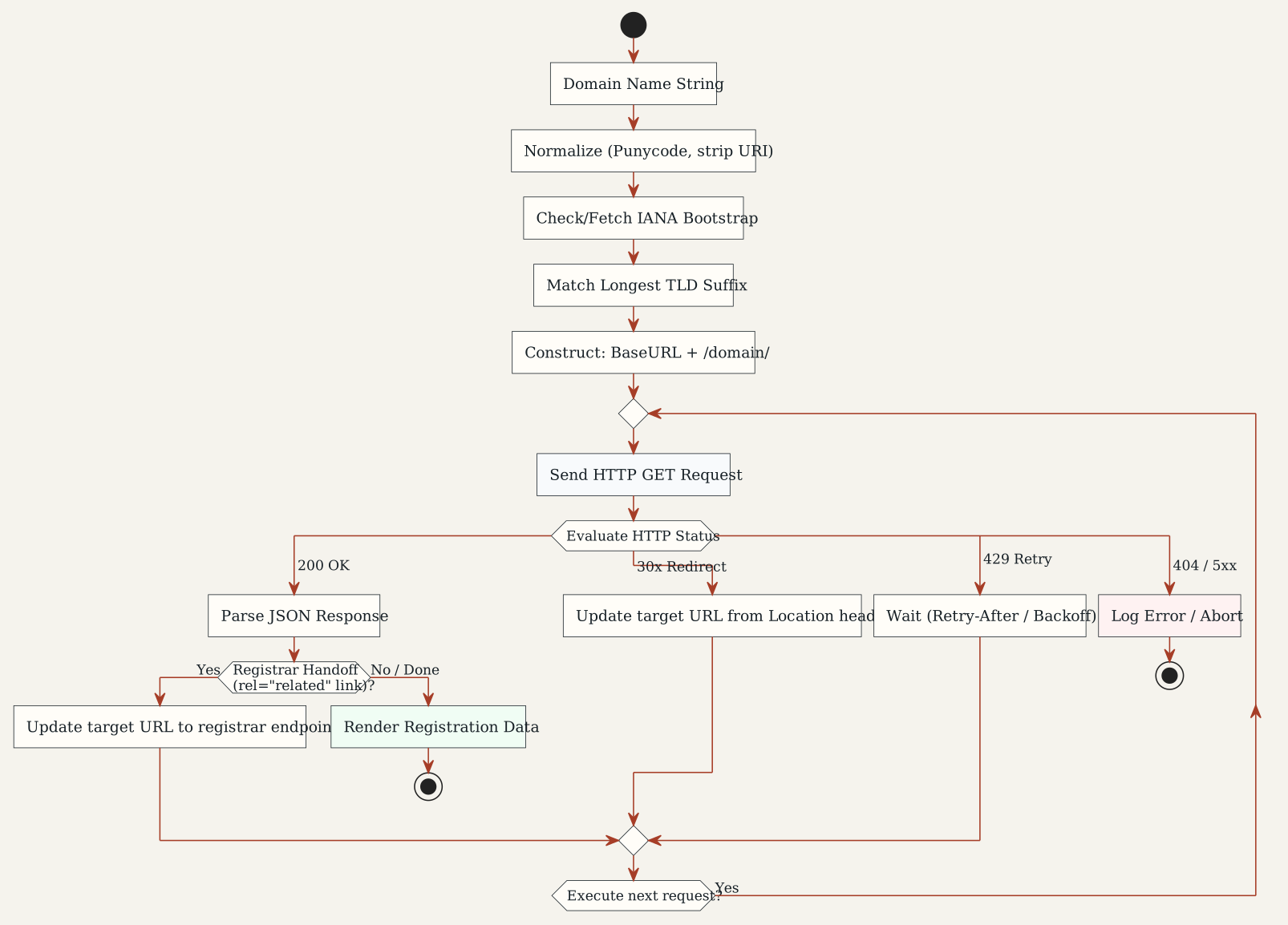
Figure 1: The complete RDAP query lifecycle, from IANA bootstrap matching to handling HTTP redirects and registrar handoffs.
1. Normalize the domain name
Start with the complete domain name and remove anything that is not part of it, such as:
https://- A path such as
/account/login - A query string
- A port number
- A trailing dot, if your client does not otherwise handle it
Domain labels used for matching should be treated case-insensitively. Internationalized labels in the bootstrap registry are represented in their ASCII-compatible A-label form, commonly called Punycode.
For example, a browser URL should be reduced to the domain name before RDAP routing begins.
2. Find the longest matching suffix
The client compares the domain against the entries in the bootstrap file from right to left, one label at a time.
For a domain such as shop.example.fr, the .fr label produces a match with the fr bootstrap entry. If the bootstrap registry contained both a broad suffix and a more specific multi-label suffix, the longest matching entry would take precedence.
This is a label-based comparison. A partial text match inside a label is not sufficient.
3. Select a base URL
The matching service entry may contain one or more base URLs. When secure and insecure alternatives are present, RFC 9224 says clients should prefer the secure transport, which means HTTPS.
Bootstrap base URLs end with a trailing slash because the RDAP query path is appended to them. Preserve the full base path: an endpoint may be located below /rdap/, /v1/ or another operator-defined prefix.
4. Construct the domain query
According to the RDAP query format in RFC 9082, a direct domain lookup uses this path:
domain/<complete-domain-name>For example.fr, the final request is formed by combining the selected base URL with the domain path:
https://rdap.nic.fr/domain/example.frDo not replace the base path with a guessed /rdap/ path. Use the base URL exactly as published, then append the standardized query segment.
5. Follow valid HTTP redirects
An RDAP server may redirect a query to another service. A client should follow the complete URL supplied in the HTTP Location header rather than trying to rebuild or reinterpret it.
Redirects are part of normal RDAP operation. They can be used when responsibility for registration data has moved or when one service refers the client to a more authoritative source.
An IETF proposal would let clients request a handoff to a related record or ask the current server not to redirect. Read about the proposed RDAP redirect controls and their limits. These options remain work in progress, not features available from every service.
Worked example: finding the RDAP server for a .fr domain
Suppose the requested domain is example.fr.
| Step | Result |
|---|---|
| Normalize the input | example.fr |
| Extract matching suffixes | fr |
| Find the longest bootstrap match | fr |
| Read the associated base URL | https://rdap.nic.fr/ |
| Append the lookup path | domain/example.fr |
| Construct the request | https://rdap.nic.fr/domain/example.fr |
The same routing process applies regardless of whether the queried domain is registered. Bootstrap discovery selects the server responsible for the namespace; the subsequent RDAP response determines whether the requested object exists and what information can be returned.
What if the TLD is not listed by IANA?
An absent bootstrap entry does not necessarily prove that no RDAP service exists.
The standard interpretation is narrower: if the requested value is absent from the relevant bootstrap registry, the bootstrap method has no known RDAP server for it. RFC 9224 explicitly notes that allocated resources are not guaranteed to appear in a bootstrap registry immediately—or at all.
In practice, a TLD can fall into one of three categories:
| Status | Meaning |
|---|---|
| IANA-listed | IANA publishes one or more RDAP base URLs for the suffix. |
| Independently discovered | A functioning endpoint has been found through operator information or direct verification but is not present in the IANA bootstrap file. |
| No known public endpoint | No public RDAP endpoint is currently known through either source. |
Our State of RDAP dataset tracks these categories across country-code TLDs and records supporting evidence for independently discovered services.
Independently discovered endpoints should be handled carefully. A hostname that looks plausible is not evidence that it is an official service. Prefer endpoints published by the registry operator or its documented technical provider, and retain the source and verification date.
Understanding common RDAP responses
Finding the correct endpoint does not guarantee a 200 OK response. The result also depends on the requested domain, server policy and request rate.
| HTTP response | What it usually means |
|---|---|
200 OK |
The server returned an RDAP response for the requested object. |
301, 302, 303 or 307 |
The client should follow the complete URL in the Location header. |
400 Bad Request |
The server could not interpret the request as a valid RDAP query. |
404 Not Found |
The server has no data matching the requested object. This does not automatically mean the RDAP endpoint is broken. |
429 Too Many Requests |
The client has reached a rate limit and should slow down. |
5xx |
The service encountered a server-side problem or is temporarily unavailable. |
The RDAP HTTP specification says clients receiving 429 Too Many Requests should decrease their request rate and honor Retry-After when the header is present. Repeating the request immediately can extend or intensify the restriction.
A valid RDAP error response may itself be JSON. Clients should interpret both the HTTP status and the response body rather than assuming every non-200 response is a connection failure.
Practical guidance for RDAP clients
Cache the bootstrap registry
Do not download the IANA file before every domain query. RFC 9224 recommends caching bootstrap data and using HTTP cache information, including the Expires header, to decide when to refresh it.
Caching reduces latency, avoids unnecessary traffic to IANA and allows lookups to continue when the bootstrap file is temporarily unreachable. A client can retain a previously validated copy as a fallback while attempting a controlled refresh.
Preserve the published base URL
Do not assume every RDAP service lives at the root of a hostname. Preserve the scheme, hostname, port and path supplied in the bootstrap entry.
The difference between these URLs can be significant:
https://example-registry.test/https://example-registry.test/rdap/https://example-registry.test/domain/
Only the first two could be base URLs, depending on what the registry publishes. Appending a query to a guessed path can silently route the request to the wrong location.
Treat discovery and availability as different questions
The bootstrap file identifies the service published for a suffix. It does not continuously monitor that service.
An endpoint can be correctly listed but temporarily unavailable, misconfigured or non-conformant. Conversely, an unlisted endpoint may respond successfully even though it is absent from IANA’s registry.
For monitoring or research, record these states separately:
- Listed in the bootstrap registry
- Reachable over HTTPS
- Returned an RDAP-formatted response
- Returned data for the test object
- Redirected to another service
Validate the response format
RDAP responses normally use the application/rdap+json media type. A 200 response containing an HTML landing page is not equivalent to a valid RDAP result.
Useful checks include the HTTP status, content type, JSON validity and the rdapConformance member of the response. Clients should also ignore unrecognized JSON members so that extensions do not break otherwise valid responses.
Handle internationalized domains consistently
Bootstrap entries use lowercase A-labels. RDAP domain queries may support A-label or Unicode U-label forms, but mixing the two forms inside the same name can produce inconsistent behavior.
For predictable routing, normalize the suffix to lowercase A-label form before matching it against the IANA file.
Find the endpoint automatically
You do not need to inspect the bootstrap registry manually for a normal lookup. Enter a domain into the RDAP lookup tool to route the request and view the response in a readable format.
If you prefer to work in a terminal, follow the guide to querying an RDAP server with cURL after selecting the authoritative base URL.
The manual process remains useful when you are:
- Building an RDAP client
- Debugging an incorrect endpoint selection
- Auditing registry deployment
- Migrating a WHOIS integration
- Investigating a TLD that is missing from the IANA bootstrap file
Frequently asked questions
Can I query every domain through one RDAP server?
No. RDAP is distributed across registry and registrar services. A redirector or aggregation service can provide a single entry point, but authoritative registration data still originates from the responsible registration service.
Does every TLD have an RDAP server?
No public RDAP service is currently known for every TLD. Coverage also differs between generic TLDs and country-code TLDs. Check the State of RDAP for the ccTLD coverage currently documented by RDAPLookup.
Does a 404 Not Found response mean I selected the wrong server?
Not necessarily. A correctly selected RDAP server can return 404 when it has no registration data for the requested domain. Check whether the response is RDAP-formatted before concluding that the endpoint is invalid.
What should a client do when a TLD is missing from the bootstrap file?
The client should report that the standard bootstrap process has no known RDAP server. An application may optionally consult a separately maintained endpoint directory, but it should clearly distinguish those records from IANA-listed services and preserve their provenance.
Can the bootstrap system also find RDAP servers for IP addresses and AS numbers?
Yes. IANA maintains separate bootstrap registries for IPv4 ranges, IPv6 ranges and Autonomous System number ranges. Those registries use longest-prefix or range matching rather than domain-suffix matching.
The key principle
Finding an RDAP server is a routing operation, not a guessing exercise.
Use the IANA bootstrap registry as the primary source, perform the longest label-wise match, preserve the published base URL and append the standardized domain query path. Follow valid redirects, cache bootstrap data responsibly and distinguish a missing registration object from a missing RDAP service.
When IANA has no entry, document that limitation clearly. Independently discovered endpoints can fill genuine coverage gaps, but they should supplement—not silently replace—the standard bootstrap process.