How to Read a Domain RDAP Response
A practical field-by-field guide to understanding the structured JSON returned for a domain by an RDAP service.
On this page
- The short version
- A simplified RDAP response
- rdapConformance: which specifications are in use
- objectClassName: what kind of object was returned
- handle: the registry’s identifier
- ldhName and unicodeName: reading the domain name
- status: locks, holds and lifecycle states
- events: registration, expiration and update dates
- entities: who is associated with the domain
- How to read vcardArray
- nameservers: where the domain is delegated
- secureDNS: interpreting DNSSEC information
- notices and remarks: context you should not skip
- links: canonical and related resources
- Why fields may be missing or redacted
- Registry responses are not identical
- A practical reading order
- Frequently asked questions
- Read a live response
An RDAP lookup returns registration data for a domain, IP address or Autonomous System Number as structured JSON. That makes the response easier for software to process than traditional WHOIS text, but the first response you open can still feel complicated. Important information may be spread across status, events, entities, nameservers, secureDNS, notices and other members.
This guide explains the most useful parts of a domain RDAP response, what each field means and which details should not be interpreted in isolation.
For an address lookup, use the separate guide to reading an IP address RDAP response, which covers network boundaries, CIDR prefixes, RIR allocation hierarchy and abuse contacts. For Autonomous System registrations, see how to read an ASN RDAP response.
If you have not yet identified the authoritative service, begin with our guide to finding the RDAP server for a domain. You can then query the RDAP server with cURL, or run an RDAP lookup and follow the response while reading this guide.
The short version
For a quick review of a domain, start with these fields:
| Field | What it tells you |
|---|---|
ldhName |
The domain in ASCII-compatible form |
unicodeName |
The internationalized form, when supplied |
status |
Locks, holds and lifecycle conditions affecting the domain |
events |
Dates such as registration, expiration and last change |
entities |
Organizations or contacts and the roles they perform |
nameservers |
Nameservers associated with the domain |
secureDNS |
DNSSEC-related information |
notices and remarks |
Service terms, redaction, truncation and object-specific context |
links |
Canonical, related or alternate resources |
Do not assume every server will return every optional field. Registry policy, authorization, privacy rules, object type and supported RDAP extensions can all change what appears in a response.
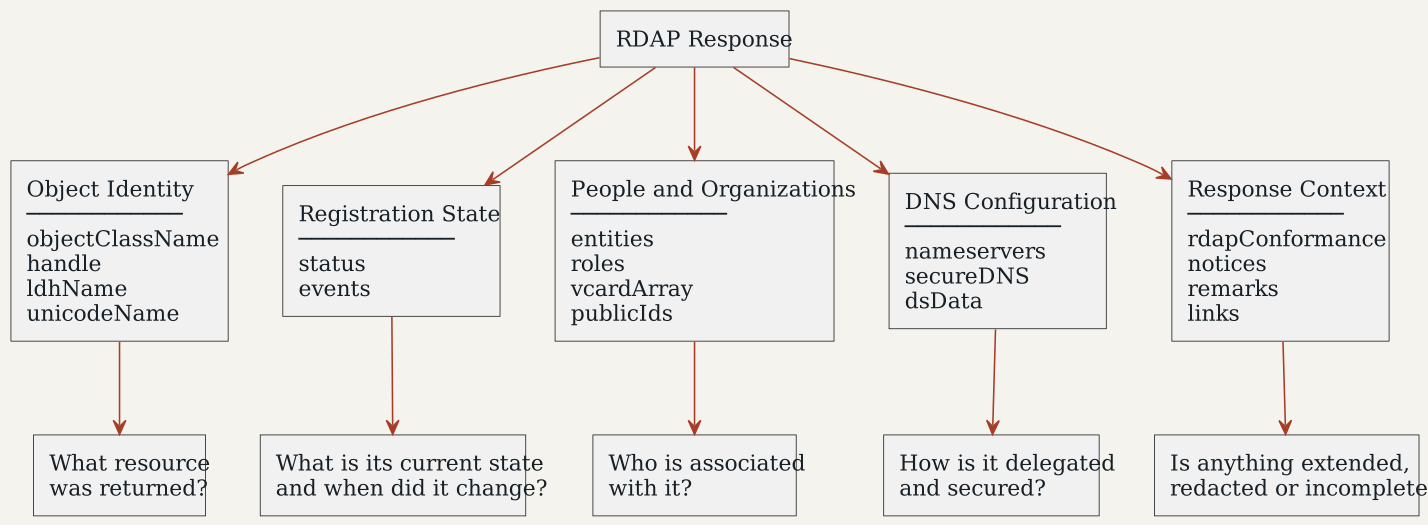
Figure 1: The main sections of a domain RDAP response and the questions each section helps answer.
A simplified RDAP response
The following example is intentionally shortened. Real responses often contain additional entities, links, notices and registry-specific extensions.
{
  "rdapConformance": ["rdap_level_0"],
  "objectClassName": "domain",
  "handle": "EXAMPLE-REGISTRY-ID",
  "ldhName": "example.com",
  "status": [
    "client transfer prohibited"
  ],
  "events": [
    {
      "eventAction": "registration",
      "eventDate": "1995-08-14T04:00:00Z"
    },
    {
      "eventAction": "expiration",
      "eventDate": "2027-08-13T04:00:00Z"
    },
    {
      "eventAction": "last changed",
      "eventDate": "2026-01-15T09:30:00Z"
    }
  ],
  "entities": [
    {
      "objectClassName": "entity",
      "handle": "REGISTRAR-123",
      "roles": ["registrar"],
      "publicIds": [
        {
          "type": "IANA Registrar ID",
          "identifier": "123"
        }
      ],
      "vcardArray": [
        "vcard",
        [
          ["version", {}, "text", "4.0"],
          ["fn", {}, "text", "Example Registrar, Inc."]
        ]
      ]
    }
  ],
  "nameservers": [
    {
      "objectClassName": "nameserver",
      "ldhName": "ns1.example.net"
    },
    {
      "objectClassName": "nameserver",
      "ldhName": "ns2.example.net"
    }
  ],
  "secureDNS": {
    "delegationSigned": true,
    "dsData": [
      {
        "keyTag": 12345,
        "algorithm": 13,
        "digestType": 2,
        "digest": "ABCD..."
      }
    ]
  },
  "notices": [
    {
      "title": "Terms of Use",
      "description": ["Use of this service is subject to the registry policy."]
    }
  ]
}
The dates and identifiers above are illustrative. Always read the values returned by the authoritative RDAP service for the resource you are investigating.
rdapConformance: which specifications are in use
rdapConformance is an array at the top level of the response. It identifies the RDAP specifications and registered extensions used to construct that response.
The value rdap_level_0 indicates conformance with the base RDAP JSON response specification. Additional values may identify extensions that add fields or define specialized behavior.
For developers, this array is a useful capability signal. A client should recognize the extensions it supports while remaining tolerant of fields it does not understand. The RDAP specification explicitly allows extensions and advises clients to ignore unrecognized JSON members rather than treating the response as invalid.
objectClassName: what kind of object was returned
objectClassName identifies the type of the current RDAP object. Common values include:
domainnameserverentityip networkautnum
For a normal domain lookup, the top-level value is usually domain. Nested nameserver and entity objects have their own objectClassName values.
This field matters when one parser handles several types of RDAP data. An IP-network response, for example, contains network-specific fields that do not belong to a domain response.
handle: the registry’s identifier
The handle is a registry-assigned identifier for the object in which it appears. A domain, entity or nameserver can have its own handle.
Treat it as an identifier within the issuing registration system, not as a universal ID. Two different registries can use different handles for equivalent or related objects. A registrar entity may also include a publicIds entry containing a more broadly recognized identifier, such as an IANA Registrar ID.
ldhName and unicodeName: reading the domain name
ldhName contains a domain name using letters, digits and hyphens. Internationalized labels are represented in their ASCII-compatible form, commonly beginning with xn--.
When provided, unicodeName gives the corresponding human-readable internationalized name. Applications should preserve the distinction instead of assuming the displayed Unicode value is interchangeable with the ASCII form in every technical context.
For an ordinary ASCII domain, you may see only ldhName.
status: locks, holds and lifecycle states
The status member is an array because a domain can have several conditions at the same time. One status might describe a security lock, another a lifecycle stage and another whether the domain is active in DNS.
For example:
"status": [
  "client transfer prohibited",
  "client update prohibited"
]
These values normally mean that the registrar has blocked transfers and certain updates. They do not, by themselves, mean the domain is expired or unavailable.
Common groups include:
- Client statuses: set by the sponsoring registrar, such as client transfer prohibited or client hold.
- Server statuses: set by the registry, such as server hold.
- Lifecycle statuses: describe stages or pending operations, such as redemption period and pending delete.
Always interpret the complete array. Our RDAP status-code reference explains each registered value and its corresponding machine-readable EPP form.
events: registration, expiration and update dates
The events array records events associated with the object. Each entry contains an eventAction and an eventDate; it may also identify an actor or provide links.
Frequently encountered actions include:
registration: when the object was initially registered in the relevant systemexpiration: the recorded expiration datelast changed: when registration data was last changedlast update of RDAP database: when the RDAP database or response data was refreshedtransfer: a registrar event associated with a registrar transfer
Dates use an Internet date-and-time format and will commonly end in Z, meaning UTC.
Be careful with similar-looking timestamps. last changed concerns the registration object, whereas last update of RDAP database concerns the data service. Neither necessarily tells you when a website or DNS record was last modified.
An expiration event should also not be treated as a guarantee that the domain becomes publicly available on that exact date. Auto-renew grace periods, redemption, pending deletion and registry-specific policies can follow expiration.
entities: who is associated with the domain
An entity represents a person, organization, registrar or operational contact. The roles array explains why that entity is connected to the domain.
Possible roles include:
registrantregistraradministrativetechnicalbillingabuse
Do not identify an entity by its position in the array. Read its roles value. Entities can also contain nested entities, so a registrar may include a separate abuse contact beneath it.
Public registration responses frequently omit or redact personal contact information. An absent registrant name is therefore not evidence that a domain has no registrant. Review the response’s notices, remarks and redaction-related extensions for context.
How to read vcardArray
Contact information inside an entity is commonly represented as a vcardArray, using the JSON form of vCard known as jCard. Its nested arrays are compact but not immediately intuitive.
"vcardArray": [
  "vcard",
  [
    ["version", {}, "text", "4.0"],
    ["fn", {}, "text", "Example Registrar, Inc."],
    ["email", {"type": "work"}, "text", "abuse@example.test"]
  ]
]
Each property generally follows this pattern:
[property name, parameters, value type, value]In the example:
fnis the formatted name.{}means that the property has no additional parameters.textidentifies the value type.- The fourth item is the value to display or process.
Other properties can represent an email address, telephone number, organization, title or postal address. Some values—especially addresses—can themselves be arrays. A robust parser should process properties by name and type instead of relying on a fixed order.
The fn property is required by the underlying jCard rules, but it can be empty when a contact name does not exist or has been redacted. This is another reason not to infer ownership from a single missing string.
nameservers: where the domain is delegated
The nameservers array lists nameserver objects associated with the domain. A minimal object may contain only objectClassName and ldhName; other responses can include a Unicode name, handle, IP addresses, events, statuses or links.
Nameservers in RDAP help show the registration-side delegation. They do not prove that every nameserver is reachable, authoritative or serving the expected DNS records. Verifying DNS operation requires DNS queries in addition to reading the RDAP response.
If a domain has an inactive or hold status, its RDAP record may still exist even though it is not resolving through DNS.
secureDNS: interpreting DNSSEC information
For domain objects, the optional secureDNS structure carries DNSSEC-related registration data. Important members can include:
delegationSigned: whether the delegation is signed, typically reflected by DS data at the parentzoneSigned: whether the zone has been signed, when the server supplies this valuedsData: DS records held by the registration systemkeyData: DNSKEY-related data, when supplied instead of or alongside DS datamaxSigLife: a requested or reported maximum signature lifetime in seconds
Inside dsData, you may find the key tag, algorithm number, digest type and digest. These values describe material used to establish the chain of trust.
However, an RDAP response is not a complete DNSSEC validation. It can show that delegation data exists, but it does not prove that current DNS responses validate successfully. To audit the chain, query DNS from the root through the parent and authoritative nameservers and validate the signatures themselves.
notices and remarks: context you should not skip
notices and remarks share a similar structure, but their scope differs:
noticesapply to the RDAP service or the response as a whole and appear at the top level.remarksdescribe the particular object in which they appear.
They may contain:
- terms of service
- rate-limit information
- links to policies or forms
- statements about redacted data
- warnings that a response was truncated
- registry-specific explanatory text
A description is an array of strings rather than one guaranteed paragraph. Clients should preserve the semantic breaks between its entries when displaying the text.
Never discard notices and remarks merely because they are human-readable. They can explain why expected registration data is unavailable or why a result should not be treated as complete.
links: canonical and related resources
The links array connects the current object or response to other resources. Each link normally includes:
rel: the relationship, such asself,related,uporalternatehref: the target URIvalue: the context URItype: the media type, oftenapplication/rdap+json
A self link generally identifies the RDAP representation of the current object. A related link can lead to an associated resource. An alternate link may provide another representation, such as a human-readable policy page.
Software should inspect rel and type rather than guessing a link’s purpose from its position in the array.
Why fields may be missing or redacted
RDAP provides a standardized data model, but it does not require every possible field to be returned in every public response. Data may be absent because:
- the field is optional
- the registry does not collect or publish it
- access is restricted by authorization level
- privacy or disclosure policy applies
- the server uses an extension to describe redaction
- the data does not apply to that object
Absence and redaction are not always the same thing. Look for explanatory notices, remarks and registered RDAP extensions before drawing a conclusion.
This is one of the major differences developers encounter when moving from WHOIS to RDAP: a parser must understand structured objects while remaining tolerant of optional, repeated and extended data.
Registry responses are not identical
Two authoritative RDAP services can both comply with the standard while returning different amounts of information. Differences may include:
- which optional fields are present
- how entities are nested
- which events are published
- whether DNSSEC key or DS data is included
- the notices and policy links provided
- the use of registered extensions
- redaction and authenticated-access behavior
Avoid building a parser around one registry’s sample response. Read the object type, process arrays without assuming order, tolerate missing optional members and ignore extensions you do not support.
A practical reading order
When examining a domain response manually, use this sequence:
- Confirm that
objectClassNameisdomainand verifyldhName. - Read every value in
status, not just the first one. - Compare the registration, expiration and last-change events.
- Identify entities by their
roles, especially the registrar and abuse contact. - Review the nameservers and compare them with live DNS results if availability matters.
- Inspect
secureDNSand independently validate DNSSEC when security is being audited. - Read notices and remarks for redaction, truncation and policy information.
- Follow only links whose relationship and media type match what you need.
- Check
rdapConformancebefore processing extension-specific fields.
This approach turns a large JSON document into a set of smaller questions: What object is this? What state is it in? When did it change? Who is responsible for it? How is it delegated? Is information missing, and why?
Frequently asked questions
Is RDAP data the same as WHOIS data?
They can describe much of the same registration information, but they are not interchangeable formats. WHOIS generally returns loosely structured text. RDAP uses standardized JSON objects, HTTPS, explicit links, internationalization support and clearer mechanisms for differentiated access and extensions.
Why does an RDAP response contain several statuses?
Each status can describe a separate condition. A domain may have a registrar transfer lock while also being in a renewal period, for example. Interpret the complete status array using the RDAP status directory.
Does the RDAP expiration date show when a domain will become available?
No. It shows an expiration event reported by the registration system. Grace periods, redemption, pending deletion and registry policy may delay deletion or re-registration.
Why is the registrant’s name missing?
The name may be withheld under privacy or disclosure policy, unavailable to an unauthenticated user, represented through an extension, or simply not published by that service. Check the relevant entity, notices and remarks before assuming the data does not exist.
Does delegationSigned: true prove that DNSSEC works?
No. It indicates signed-delegation information in the registration data, but successful DNSSEC validation also depends on the current DNS records, signatures, algorithms, timing and complete chain of trust.
Can one parser handle every RDAP server?
Yes, if it follows the base data model and is designed for variation. It must tolerate omitted optional fields, repeated and nested objects, different ordering, registered extensions and unknown members.
Read a live response
The easiest way to become familiar with RDAP is to inspect a real result. Run an RDAP lookup, then use this guide to work through the object type, statuses, events, entities, nameservers, DNSSEC information and notices.
For the formal data model, consult RFC 9083: JSON Responses for RDAP. Query paths are defined in RFC 9082, while registered statuses, roles and event actions are maintained in the IANA RDAP JSON Values registry.